
FOR BOOKKEEPERS · CUSTOM DASHBOARDS
Turn month-end reports into charts your clients actually look forward to.
Give your clients a clear, visual look at their business every month, built from the P&L and balance sheet you already prepare.
Early Adopter price: $1,495 $795

SOUND FAMILIAR?
You send the reports. They don't read them.
Right now: You close the books, send the reports, and your client skims the email, or skips it altogether.
With the Dashboards: It's not another PDF. It's a live dashboard, and your clients are excited to open it and SEE where their numbers landed this month.
Right now: You explain the same P&L every month, and it still doesn't stick.
With the Dashboards: They see their progress at a glance, month after month, and can pull up the numbers behind any chart when they want to dig in.
Right now: Clients ask "are we doing okay?" without ever looking at the reports.
With the Dashboards: They can see the answers to the questions they ask you over and over.
Right now: Sending the same reports every month is standard practice, and there's no extra charge for it.
With the Dashboards: You have a reporting upgrade worth charging for.
LISTEN, I GET IT
It's not that your clients don't care.
You spend hours getting the books right. You reconcile, you categorize, you close the month, and you send a clean set of reports. And then... a "thanks!" if you're lucky.
A P&L just isn't how most business owners think. Trends are almost impossible to spot in a PDF, and "net profit" doesn't explain why the bank account feels empty.
If you've looked for a fix, you've probably found the dashboard software out there. It's pricey, it comes with an ongoing subscription, and you get very little say in what your clients see. Want something custom? That's extra, if it's possible at all.
That's why I built the Dashboards: a fully customizable alternative that you own. The same numbers you already have, turned into charts your clients can actually read, set up exactly the way you want them. And because it all lives in one place, it's easy to offer more. Clients who want to track monthly KPIs get that as an upgrade, right in the same dashboard.
One tool. A lot of ways to show up for your clients.
-
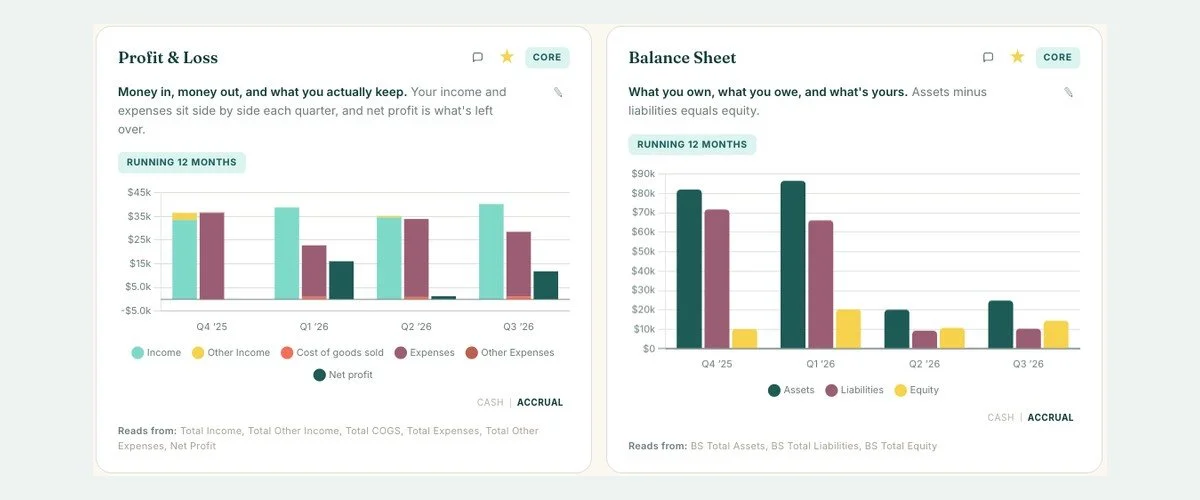
Quarterly reviews
Switch to a quarter-by-quarter view and give every client the same core charts each quarter, with your recap and items to review right beside them.
-
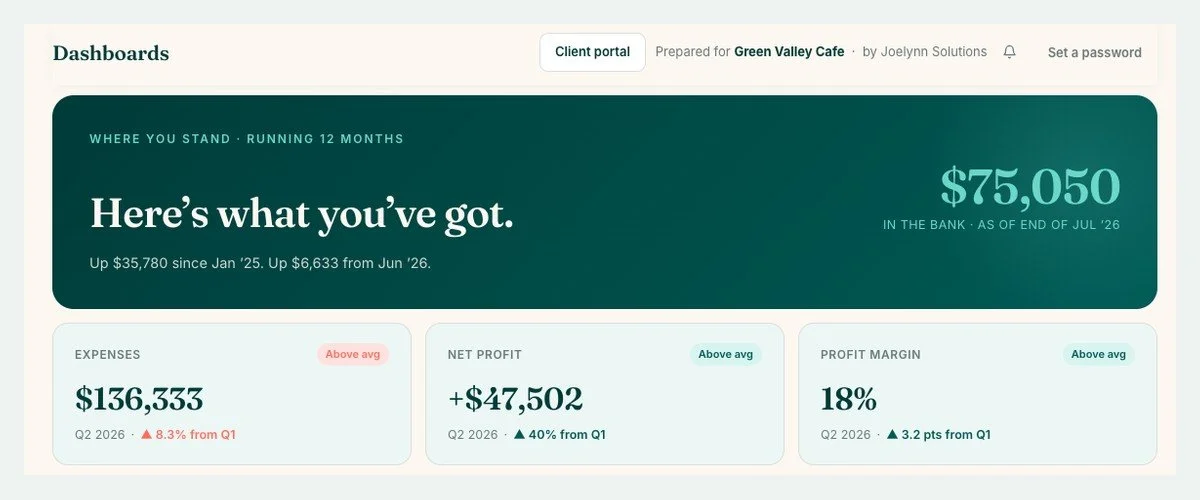
A monthly report package
Turn month-end into a visual report package your clients actually open, and price it as an upgrade to your standard bookkeeping.
-
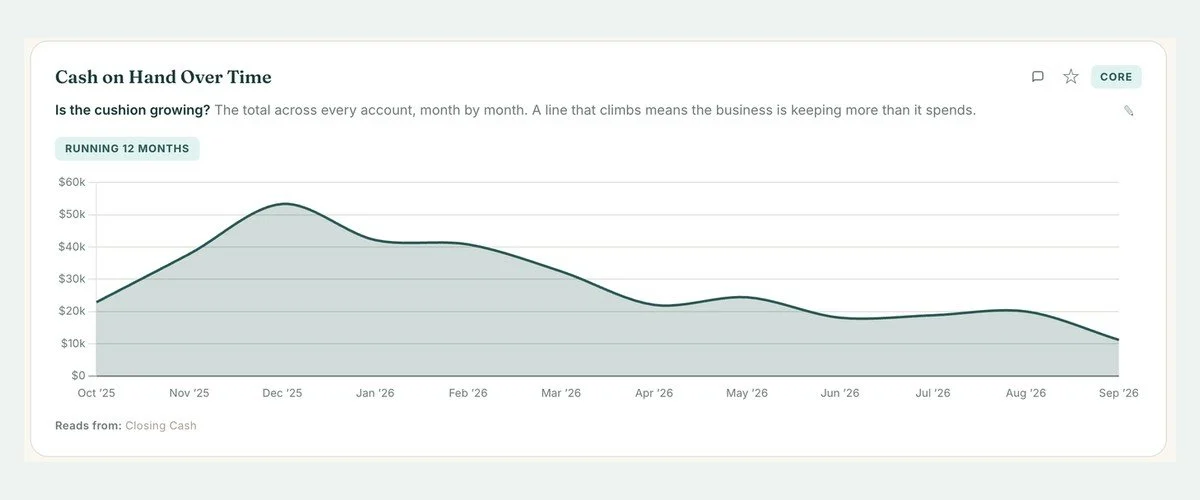
Pair it with advisory
Already offer advisory, or want to? The Dashboards give those conversations a visual. Clients want more frequent check-ins? Offer updates every two weeks at a higher price.
-
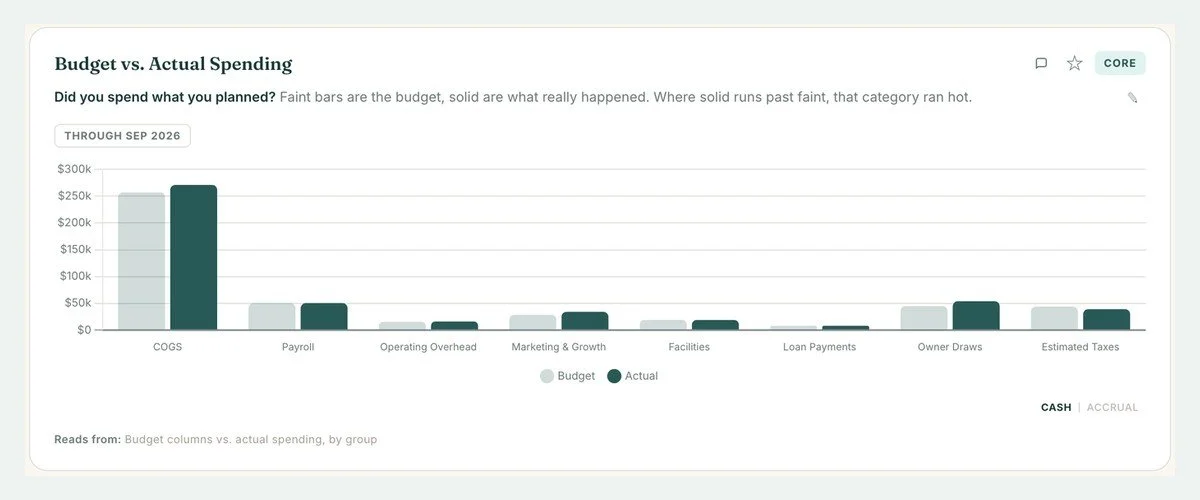
Budget vs. actual
Set budgets by category, then compare where each month actually landed, so clients see exactly where they ran over.
-
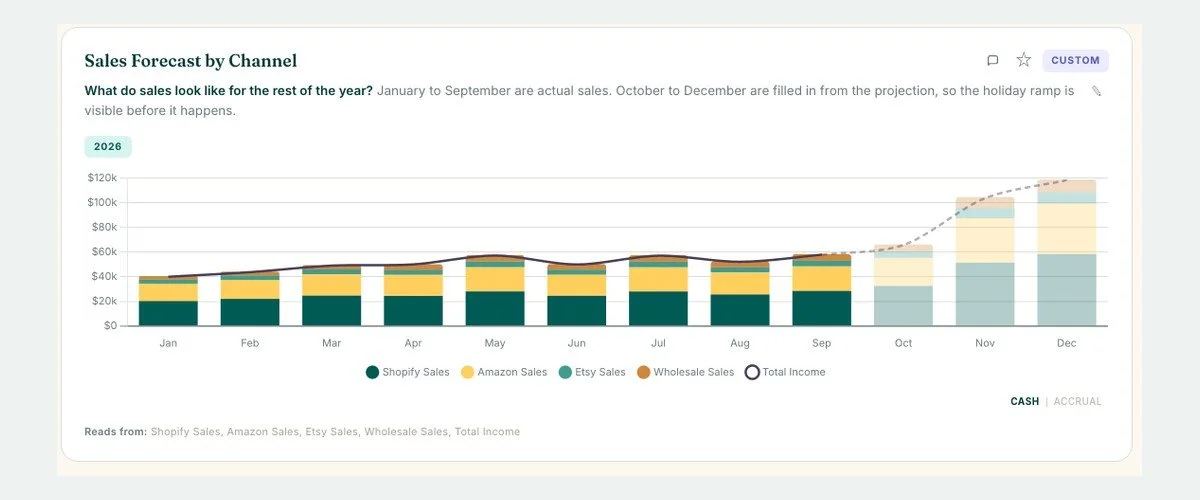
Projections and planning
Map out the rest of the year: a seasonal sales ramp, upcoming estimated tax payments, or what a new hire would do to the numbers.
-
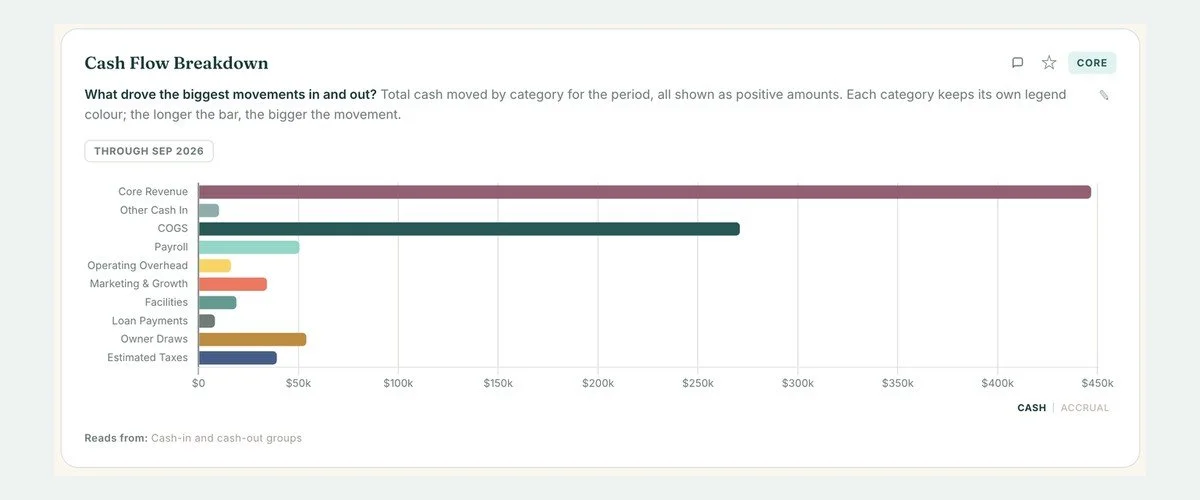
Where the cash really went
Built to show the full picture, not just the P&L. Loan principal, owner draws and estimated taxes come in too, so clients can see where all their money is moving.
-
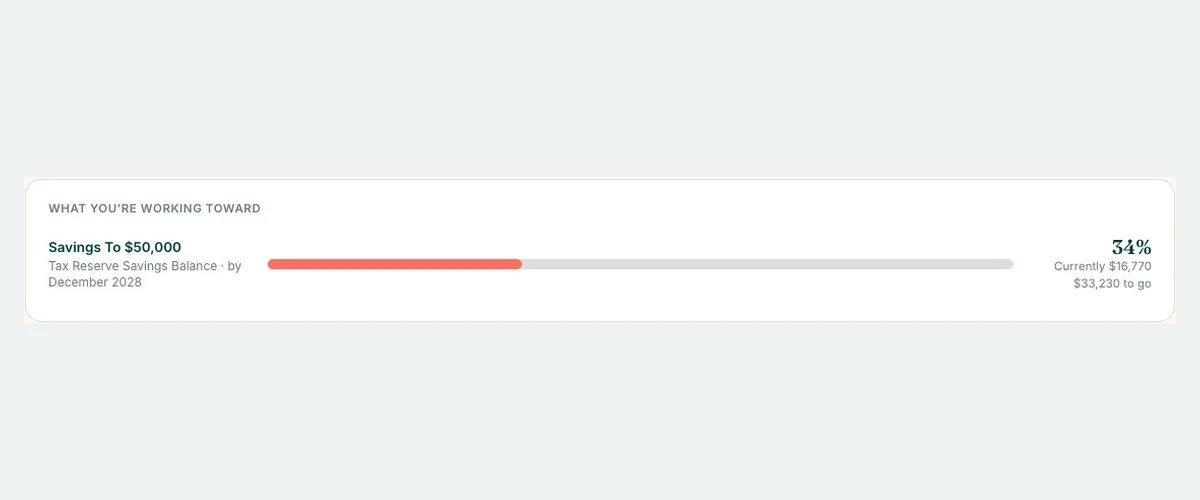
Goal tracking
Client wants a cash cushion saved before they hire? Set it as a goal and track progress together at every check-in.
-
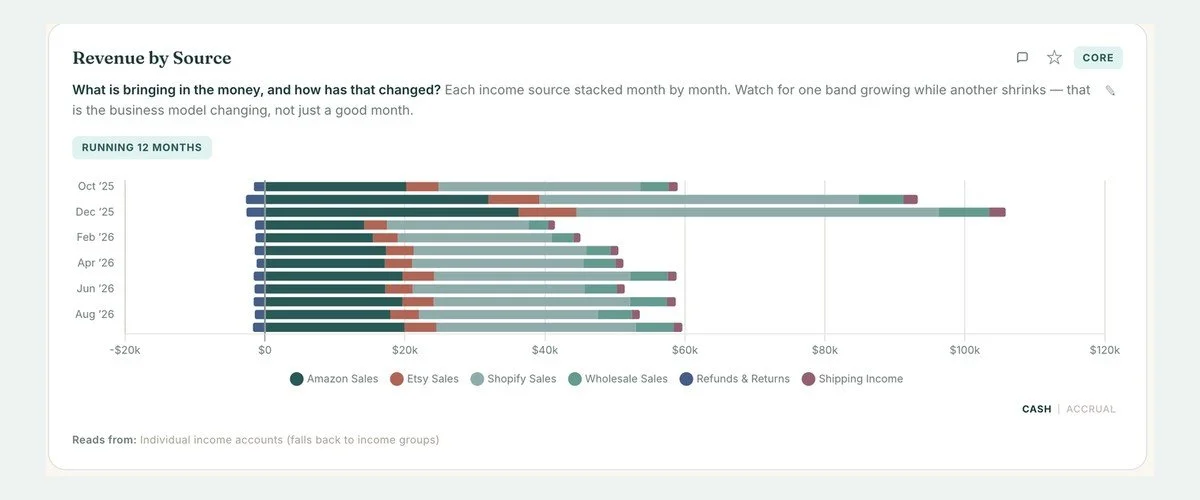
Revenue streams
Stack each income stream in one chart, like Shopify, Amazon and wholesale, or billable hours vs. a product, and see which one is growing.
-
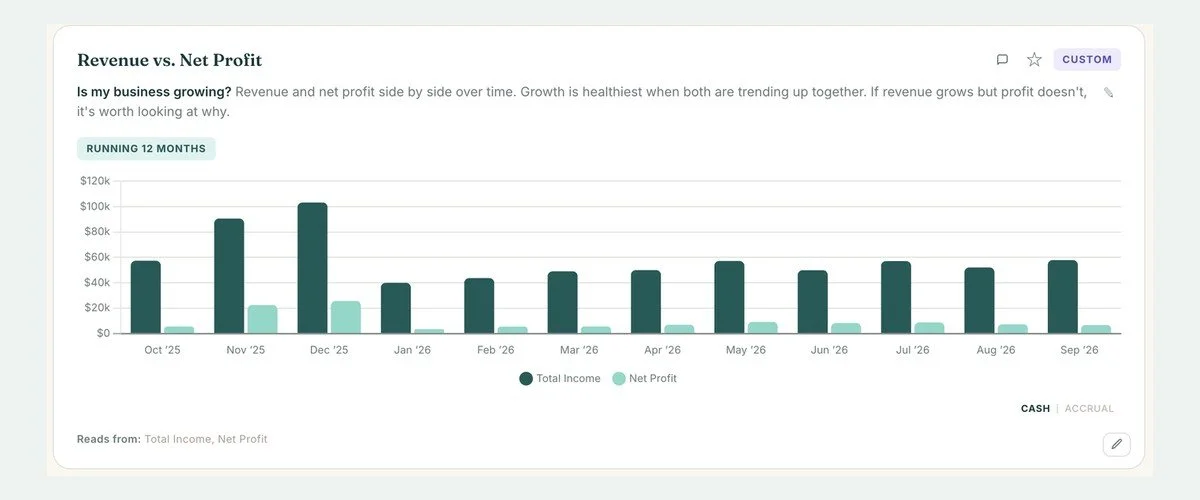
Win new clients
Show a sample dashboard in a presentation, a networking chat or a social post. It's so much easier to explain what you do when people can see it.
CUSTOM KPIS
Track the numbers that matter to your client.
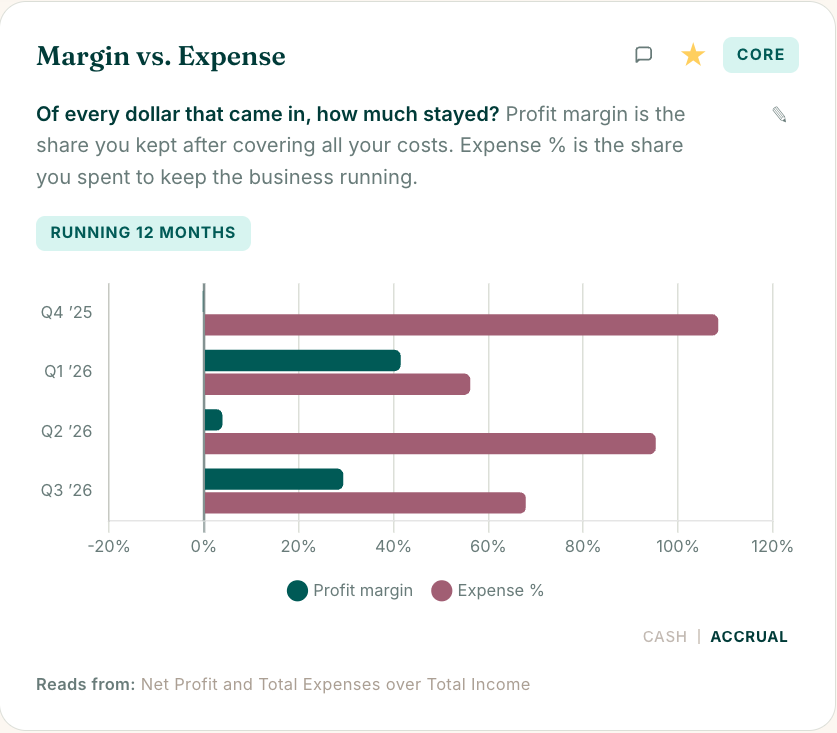
Build your own charts, and your own calculations too. If a client wants to keep an eye on it, you can build it, chart it, and watch it over time.
Clients who want to track their KPIs every month? That's an easy upgrade to offer.
A few examples
Gross margin %
Ad spend as a % of sales
Payroll % of revenue
Fees as a % of sales
Expenses as a % of revenue
Net profit margin
Fixed vs. variable costs
Months of runway
SEE IT IN ACTION
The same numbers you already have. Finally easy to read.
Your clients can scroll, hover and click into their own numbers. Sample client, made-up numbers.
Everything you need to give your first client a dashboard.
-
Custom Dashboards template ($1,495 value)
Your own copy, set up in Replit, so your clients' data stays with you.
-
Course 1: Setup to your first client dashboard
14 short video lessons (about 1 hour 12 minutes) that take you from setup to a client-ready dashboard. No coding needed.
-
25+ ready-built charts, plus a custom builder
Revenue, profit, cash flow, spending, budget, payroll, debt and more. Build your own when a client needs something specific.
-
A password-protected client view
Each client sees only their own dashboard, with your firm name and colors, and a box to send you questions before your next check-in.
-
12 months in the community
Ask questions anytime and get answers from me, plus new examples and ideas as the community grows.
-
Early Adopter bonus: every future upgrade
Every upgrade to the dashboard template, at no extra cost, for as long as the template exists. Later buyers will pay for major upgrades.
How it works
Set up your copy. Follow Course 1 to get the template running in your own Replit account. No coding, just clicking along with the videos.
Add a client. Upload their P&L and balance sheet from your accounting software, and map their accounts once.
Customize the dashboard. Pick the charts that fit this client, build custom ones for their questions, and add your notes.
Share the dashboard. Send your client a password-protected view they can open anytime.
Good to know before you buy
You'll need a paid Replit account. The Dashboards is a Replit template, so it runs in your own Replit account. I built and run mine on one of Replit's basic plans, which costs me $216 a year on annual billing. That's billed by Replit, not included in your purchase.
It doesn't connect to QuickBooks. You upload the P&L and balance sheet as CSV files, so the dashboard is as current as your last upload.
More lessons are still on the way. Course 1 has everything you need to get your dashboards up and running. Extra lessons are still being filmed and will be added as they're ready. Getting in early means a lower price, with the extras arriving over time.
EARLY ADOPTER PRICING
$1,495 $795
Pay in full, or 2 payments of $425. No subscription. Includes the Early Adopter upgrade bonus. Replit hosting is billed separately by Replit.

Hi, I'm Megan.
I've run Joelynn Solutions, my bookkeeping firm, since 2021, and I'm a QuickBooks ProAdvisor. Before that, I spent 11 years as a teacher, which is probably why I care so much about whether clients actually understand what I hand them.
When I went looking for a dashboard tool for my own clients, everything I found was expensive, and I couldn't customize any of it. So I built my own. I use it for my clients' quarterly reviews. Through The Back Office, I share the systems I use behind the scenes with other bookkeepers, so you don't have to build them from scratch.
FROM A BETA TESTER
One of our beta testers loves her dashboards, and uses it as an up-sale when clients want to see even more.
Dashboards beta tester and bookkeeper
Before you buy
-
No. Course 1 walks you through setup step by step. When you want to customize, you can ask Replit's built-in AI for changes in plain English.
-
No. You export the P&L and balance sheet from QuickBooks as CSV files and upload them. A live connection is a complex build, and QuickBooks updates so often that keeping it reliably connected would be a constant battle. I also didn't want a dashboard that forces that connection on you or your clients.
-
Your copy runs in your own Replit account with its own database. Your clients' data is never stored with me, and each client's view is password-protected.
-
Plan on about 1 to 3 hours for the whole setup. Course 1 is about 1 hour 12 minutes of video, and you can go one lesson at a time. By the end, you'll have a client-ready dashboard.
-
The standard charts work for any business with a P&L and balance sheet. For industry-specific numbers, you can build custom charts and calculations.
-
You get 12 months in the community. Post your question and we'll help you sort it out.
EARLY ADOPTER PRICING
Give your clients answers they can see.
Get the template, Course 1, 12 months in the community, and every future upgrade for $1,495 $795.
Pay in full, or 2 payments of $425. No subscription.
By purchasing, you agree to the Custom Dashboards Terms of Use.